
Teams
A Team in GuideMode represents a group of people who work together. Teams can be imported from external providers (GitHub, Jira, Linear, Notion) or created manually. They serve as the primary way to organize people, filter dashboards, and target surveys.
Overview
Section titled “Overview”Teams in GuideMode:
- Group people together for analytics and surveys
- Own repositories and projects
- Receive targeted surveys for feedback collection
- Filter dashboards to show team-specific metrics
- Organize into groups (tribes/departments) for high-level views
Team Structure
Section titled “Team Structure”
Key Fields
Section titled “Key Fields”| Field | Type | Description |
|---|---|---|
name | string | Team display name (e.g., “Frontend Team”) |
slug | string | URL-friendly identifier (e.g., “frontend-team”) |
description | string | Team description (optional) |
avatarUrl | string | Team avatar/logo URL |
iconEmoji | string | Emoji icon (from Linear) |
provider | enum | Source: ‘github’, ‘jira’, ‘linear’, ‘notion’, ‘manual’ |
groupName | string | Group/tribe name for organizing teams |
privacy | enum | ’secret’ or ‘closed’ |
isEnabled | boolean | Whether team is active (for billing limits) |
isSeedData | boolean | Demo/seed data (excluded from billing) |
Provider Integration
Section titled “Provider Integration”Teams can be imported from various providers, each with their own team model:
GitHub Teams
Section titled “GitHub Teams”| Field | Description |
|---|---|
githubOrgId | GitHub organization ID |
githubOrgLogin | Organization login (e.g., “acme-corp”) |
githubOrgName | Organization display name |
githubTeamId | GitHub team ID within the organization |
GitHub teams are synced from your connected GitHub organization. They maintain their GitHub structure and can be refreshed during sync.
Jira Teams
Section titled “Jira Teams”| Field | Description |
|---|---|
jiraTeamId | Jira team ID |
jiraOrgId | Jira organization ID |
jiraSiteName | Jira site name |
jiraCloudId | Jira cloud instance ID (for multi-site) |
Jira teams are imported from your connected Atlassian workspace.
Linear Teams
Section titled “Linear Teams”| Field | Description |
|---|---|
linearTeamId | Linear team UUID |
linearTeamKey | Team key (e.g., “ENG”, “PROD”) |
Linear teams map directly to Linear’s team concept and include the short team key.
Notion Teams
Section titled “Notion Teams”| Field | Description |
|---|---|
notionDatabaseId | Source Notion database ID |
notionTeamValue | Multi-select option value |
Notion “teams” are derived from multi-select properties in your Notion databases.
Manual Teams
Section titled “Manual Teams”Teams with provider: 'manual' are created directly in GuideMode without an external source. They’re useful for:
- Cross-functional teams not represented in any tool
- Temporary project teams
- Teams that span multiple providers
Groups (Tribes)
Section titled “Groups (Tribes)”Groups provide a way to organize teams into higher-level categories without creating hierarchy. They’re perfect for departments, tribes, or business units.
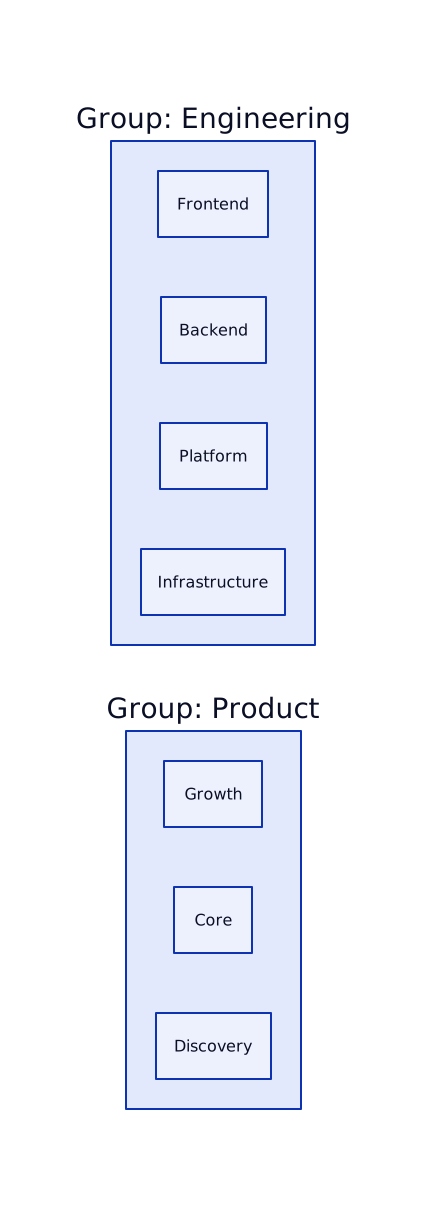
How Groups Work
Section titled “How Groups Work”- Groups are defined by the
groupNamefield on each team - Teams with the same
groupNamebelong to the same group - Groups are not separate entities - just a shared label
- Dashboards can filter by group to see aggregate metrics
Team Membership
Section titled “Team Membership”People join teams with specific roles:
| Role | Description |
|---|---|
maintainer | Team lead, can manage team settings and members |
member | Standard team member |
Multiple Team Membership
Section titled “Multiple Team Membership”People can belong to multiple teams simultaneously:
- A developer on both “Frontend” and “Design System” teams
- A tech lead who’s a maintainer of their team and member of the Platform team
- Cross-functional participants in multiple project teams
Team-Repository Assignments
Section titled “Team-Repository Assignments”Teams can be assigned to repositories, creating ownership relationships:

This assignment enables:
- Filtering issues/PRs by team
- Team-specific DORA metrics
- Ownership visibility in dashboards
Team Enablement
Section titled “Team Enablement”For subscription management, teams have an isEnabled flag:
| State | Description |
|---|---|
isEnabled: true | Team is active, counts toward subscription |
isEnabled: false | Team disabled (over limit), data still collected |
isSeedData: true | Demo data, excluded from billing counts |
When you exceed your team limit:
- Existing teams continue working
- New teams are created as disabled
- You can choose which teams to enable
- Data for disabled teams is still collected
Sync Tracking
Section titled “Sync Tracking”Teams track their synchronization status:
| Field | Description |
|---|---|
lastSyncedAt | Last successful sync from provider |
githubCreatedAt | When team was created in GitHub |
createdAt | When created in GuideMode |
updatedAt | Last modification in GuideMode |
Related Documentation
Section titled “Related Documentation”Core Concepts
Section titled “Core Concepts”- Organizations - Organization structure
- People - User accounts and membership
- Repositories - Repository ownership
- Surveys - Team-targeted surveys
Analytics & Guides
Section titled “Analytics & Guides”- Analytics Overview - Team-based analytics
- Guide Rails - Setting team KPI guide rails
Integrations
Section titled “Integrations”- Integrations Overview - Team sync across providers