
Teams
A Team in GuideMode represents a group of people who work together. Teams can be imported from external providers (GitHub, Jira, Linear, Notion) or created manually. They serve as the primary way to organize people, filter dashboards, and target surveys.
Overview
Section titled “Overview”Teams in GuideMode:
- Group people together for analytics and surveys
- Own repositories and projects
- Receive targeted surveys for feedback collection
- Filter dashboards to show team-specific metrics
- Organize into groups (tribes/departments) for high-level views
Team Structure
Section titled “Team Structure”
Key Fields
Section titled “Key Fields”| Field | Type | Description |
|---|---|---|
name |
string | Team display name (e.g., “Frontend Team”) |
slug |
string | URL-friendly identifier (e.g., “frontend-team”) |
description |
string | Team description (optional) |
avatarUrl |
string | Team avatar/logo URL |
iconEmoji |
string | Emoji icon (from Linear) |
provider |
enum | Source: ‘github’, ‘jira’, ‘linear’, ‘notion’, ‘manual’ |
groupName |
string | Group/tribe name for organizing teams |
privacy |
enum | ‘secret’ or ‘closed’ |
isEnabled |
boolean | Whether team is active (for billing limits) |
isSeedData |
boolean | Demo/seed data (excluded from billing) |
Provider Integration
Section titled “Provider Integration”A team in GuideMode is provider-neutral: it has a name, a slug unique to your organisation, and your own attributes. The identities providers know it by live separately, as provider bindings, and one team may hold several.
That is what lets the squad your GitHub organisation calls platform, your Linear
workspace calls PLAT and your Atlassian organisation calls “Platform Team” be one
team, with one set of members and one set of metrics — rather than three teams that
nothing can join up.
| Provider | What is bound | Notes |
|---|---|---|
| GitHub | The team id, within its organisation | The team’s GitHub slug is kept on the binding |
| Atlassian | The Atlassian Team id | Atlassian Team ids are issued by the organisation, so one binding covers every Jira site under it |
| Linear | The team id | The team key (e.g. “ENG”) is kept on the binding |
| Notion | A multi-select value, within its database | |
| Register import | Your own reference for the team |
Each binding also records whether it was observed by a sync or declared by your organisation register. A declared binding wins: nothing a sync sees will move it to another team.
Declaring that identities are one team
Section titled “Declaring that identities are one team”The organisation register is where you say so. A register row is a team, and its provider columns name the identities that team answers to. A name that matches nothing, or matches more than one thing, is reported as an import error rather than guessed at.
Merge proposals
Section titled “Merge proposals”Where identities have not been declared, GuideMode looks for teams that are probably the same — by name, or by shared membership — and raises a merge proposal in organisation settings. It never merges on its own: accepting one deletes a team and moves everything that pointed at it, and that cannot be undone. Two teams the same provider says are different (two GitHub teams in one organisation, say) are never proposed automatically.
Manual Teams
Section titled “Manual Teams”Teams with provider: 'manual' are created directly in GuideMode without an external source. They’re useful for:
- Cross-functional teams not represented in any tool
- Temporary project teams
- Teams that span multiple providers
Groups (Tribes)
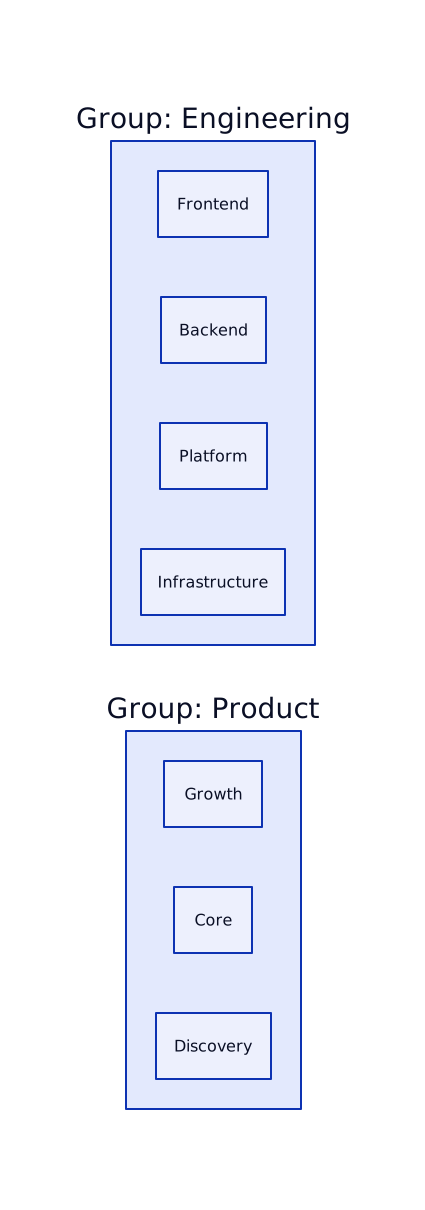
Section titled “Groups (Tribes)”Groups provide a way to organize teams into higher-level categories without creating hierarchy. They’re perfect for departments, tribes, or business units.
How Groups Work
Section titled “How Groups Work”- Groups are defined by the
groupNamefield on each team - Teams with the same
groupNamebelong to the same group - Groups are not separate entities - just a shared label
- Dashboards can filter by group to see aggregate metrics
Team Membership
Section titled “Team Membership”People join teams with specific roles:
| Role | Description |
|---|---|
maintainer |
Team lead, can manage team settings and members |
member |
Standard team member |
Multiple Team Membership
Section titled “Multiple Team Membership”People can belong to multiple teams simultaneously:
- A developer on both “Frontend” and “Design System” teams
- A tech lead who’s a maintainer of their team and member of the Platform team
- Cross-functional participants in multiple project teams
Team-Repository Assignments
Section titled “Team-Repository Assignments”Teams can be assigned to repositories, creating ownership relationships:

This assignment enables:
- Filtering issues/PRs by team
- Team-specific DORA metrics
- Ownership visibility in dashboards
Team Enablement
Section titled “Team Enablement”For subscription management, teams have an isEnabled flag:
| State | Description |
|---|---|
isEnabled: true |
Team is active, counts toward subscription |
isEnabled: false |
Team disabled (over limit), data still collected |
isSeedData: true |
Demo data, excluded from billing counts |
When you exceed your team limit:
- Existing teams continue working
- New teams are created as disabled
- You can choose which teams to enable
- Data for disabled teams is still collected
Sync Tracking
Section titled “Sync Tracking”Teams track their synchronization status:
| Field | Description |
|---|---|
lastSyncedAt |
Last successful sync from provider |
githubCreatedAt |
When team was created in GitHub |
createdAt |
When created in GuideMode |
updatedAt |
Last modification in GuideMode |
Related Documentation
Section titled “Related Documentation”Core Concepts
Section titled “Core Concepts”- Organizations - Organization structure
- People - User accounts and membership
- Repositories - Repository ownership
- Surveys - Team-targeted surveys
Analytics & Guides
Section titled “Analytics & Guides”- Analytics Overview - Team-based analytics
- Guide Rails - Setting team KPI guide rails
Integrations
Section titled “Integrations”- Integrations Overview - Team sync across providers