
Creating Guide Rails
GuideMode offers two ways to create guide rails: a manual step-by-step wizard for full control, or AI-assisted creation that recommends guide rails based on your goals in natural language.
Creating Guide Rails Manually
Section titled “Creating Guide Rails Manually”The guide rail creation wizard guides you through four steps to configure a guide rail.
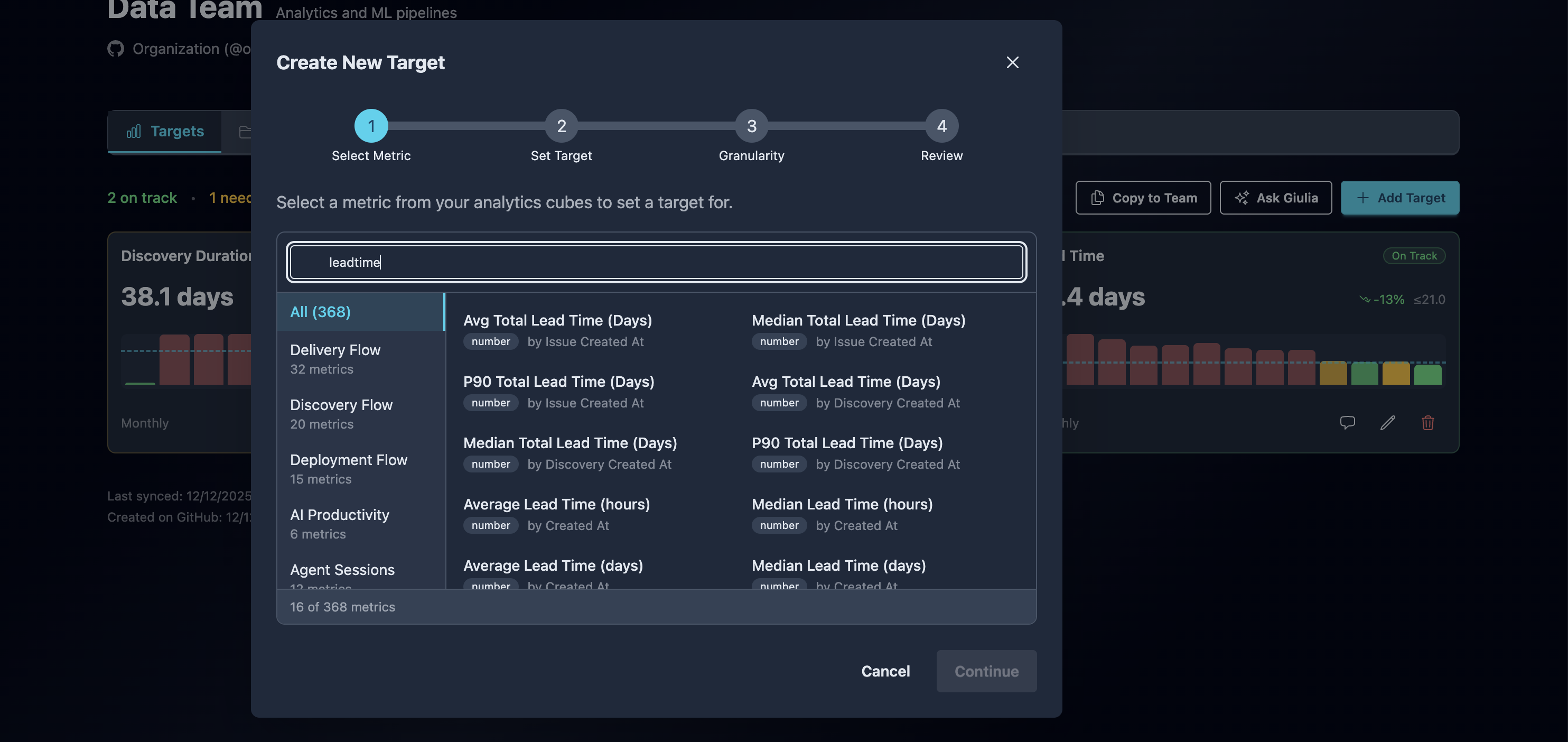
Step 1: Select Metric
Section titled “Step 1: Select Metric”Choose the metric you want to track:
- Search or Browse - Use the search box to find metrics by name, or browse by category
- Select a Cube - Metrics are organized by analytics cube (Discovery Flow, Delivery Flow, Deployment Flow, etc.)
- Choose a Measure - Select the specific metric to track (e.g., “Average Cycle Time”, “PR Merge Rate”)
- Select Time Dimension - Choose how the data is aggregated over time (e.g., by completion date, by creation date)
The measure picker shows:
- Metric name and description
- Category (which cube it belongs to)
- Type indicator (number, percentage, duration)
Step 2: Set Guide Rail Value
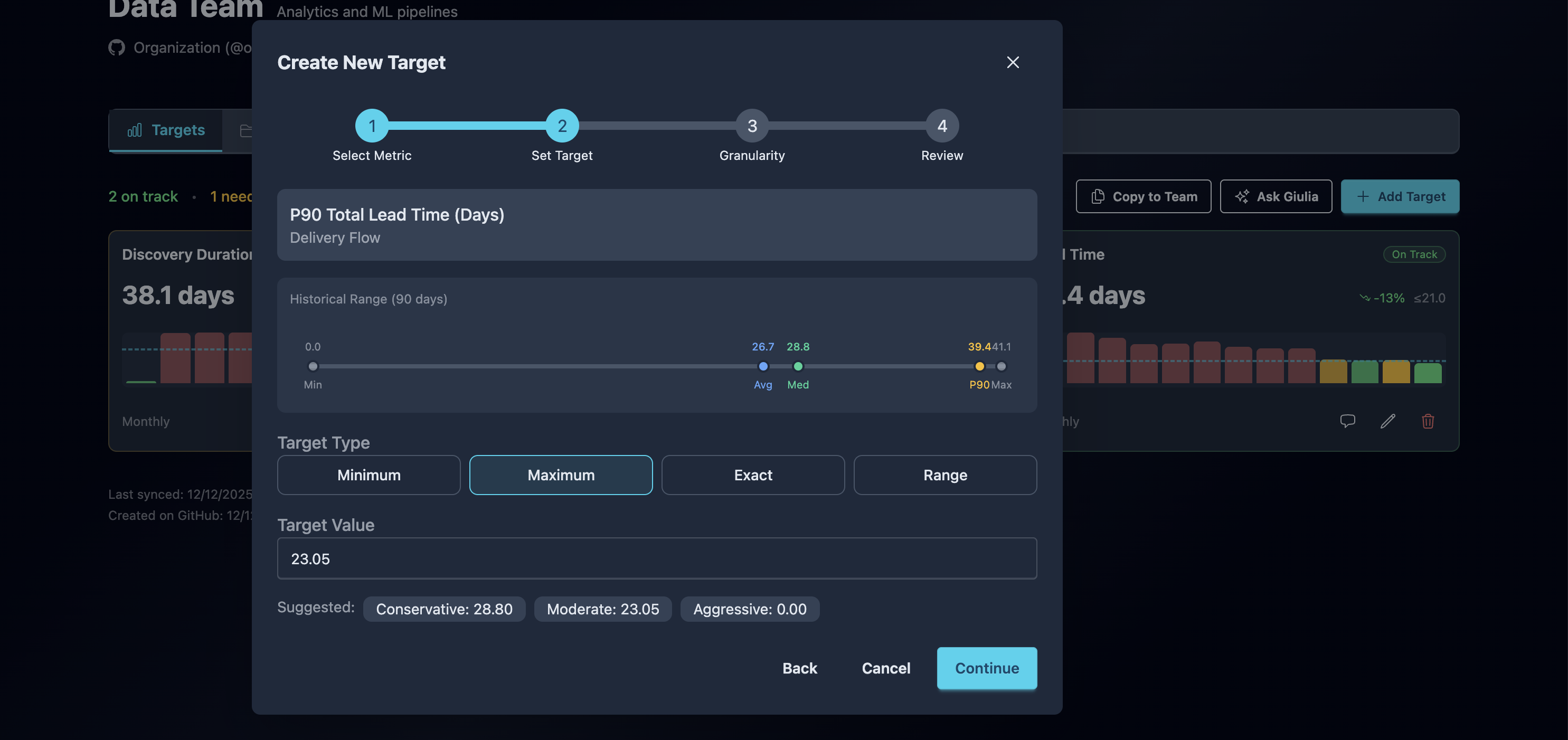
Section titled “Step 2: Set Guide Rail Value”Configure the guide rail type and value:
Guide Rail Types
Section titled “Guide Rail Types”| Type | Description | Example |
|---|---|---|
| Minimum | Value should be at least this (higher is better) | Code coverage >= 80% |
| Maximum | Value should be at most this (lower is better) | Cycle time <= 5 days |
| Exact | Value should be close to this goal | SLA = 95% |
| Range | Value should be between min and max | PR size 50-200 lines |
Using Historical Data
Section titled “Using Historical Data”The wizard displays your historical performance to help set realistic guide rails:
- Min / Max - The lowest and highest values observed
- Median - The middle value (50th percentile)
- Average - The mean value across all periods
- P90 - The 90th percentile value
The wizard suggests three guide rail levels:
- Conservative (Median) - Achievable based on current performance
- Moderate (P75) - Requires improvement from current baseline
- Aggressive (P90) - Stretch goal for top performance
Click any suggested value to use it as your guide rail.
Step 3: Set Granularity & Format
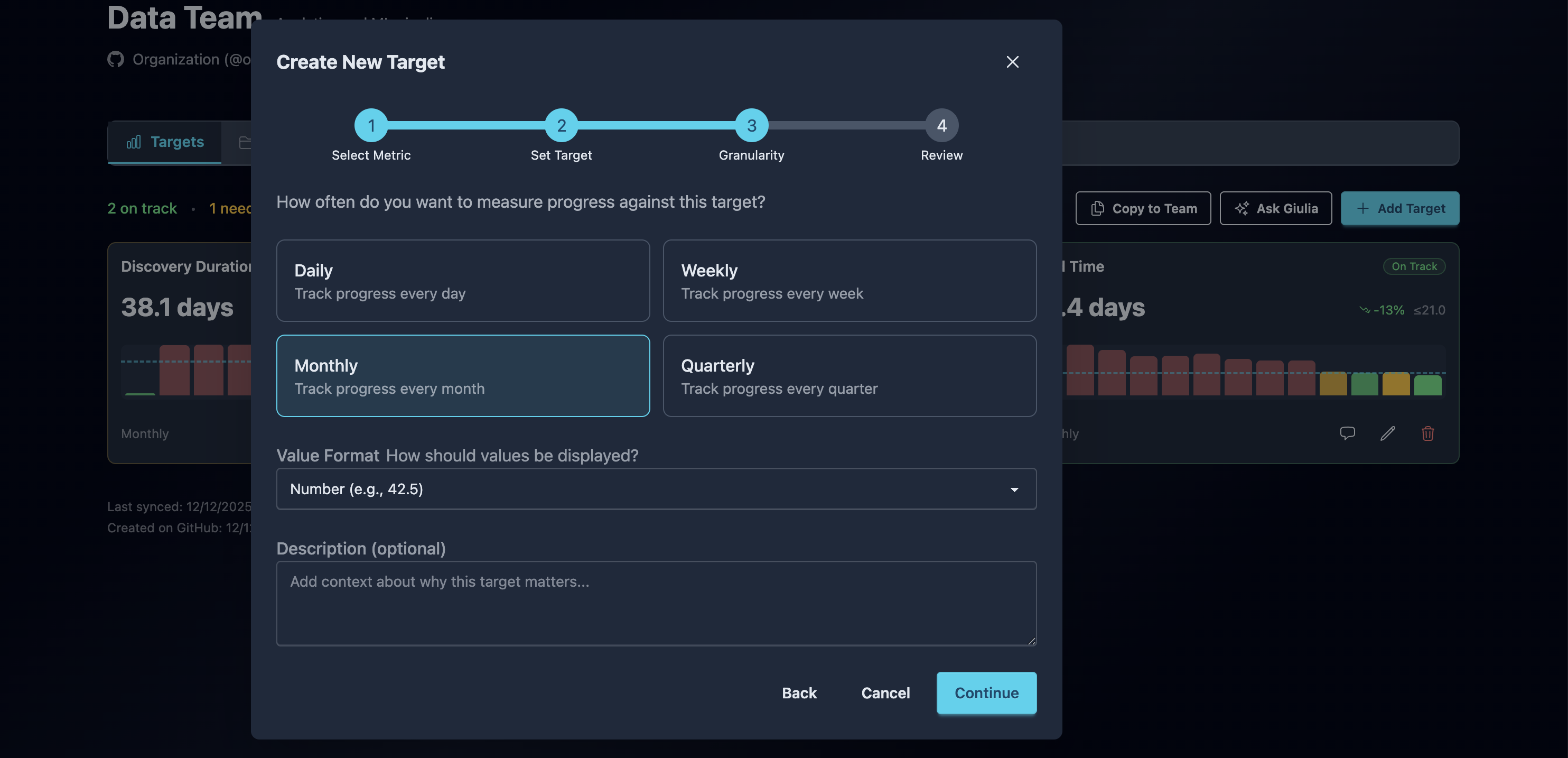
Section titled “Step 3: Set Granularity & Format”Configure how the guide rail is measured and displayed:
Granularity Options
Section titled “Granularity Options”| Option | Description | Best For |
|---|---|---|
| Daily | Measures progress every day | High-frequency operational metrics |
| Weekly | Measures progress every week | Most team performance metrics |
| Monthly | Measures progress every month | Strategic and capacity metrics |
| Quarterly | Measures progress every quarter | Long-term objectives and OKRs |
Display Format
Section titled “Display Format”Choose how values are formatted:
| Format | Example | Use For |
|---|---|---|
| Number | 42.5 | Counts, scores, raw values |
| Percent | 75% | Rates, coverage, completion |
| Duration | 3.5 days | Cycle times, lead times |
| Currency | $1,234 | Cost-related metrics |
Description (Optional)
Section titled “Description (Optional)”Add context about why this guide rail matters or what actions the team should take to achieve it.
Step 4: Review
Section titled “Step 4: Review”Confirm your guide rail configuration:
- Metric - Name, cube, and time dimension
- Guide Rail - Type and value(s)
- Tracking - Granularity and format
- Description - Any notes you added
Click Create Guide Rail to save, or go back to adjust any settings.
AI-Assisted Creation with Ask Giulia
Section titled “AI-Assisted Creation with Ask Giulia”Let GuideMode’s AI assistant recommend guide rails based on your goals.
How It Works
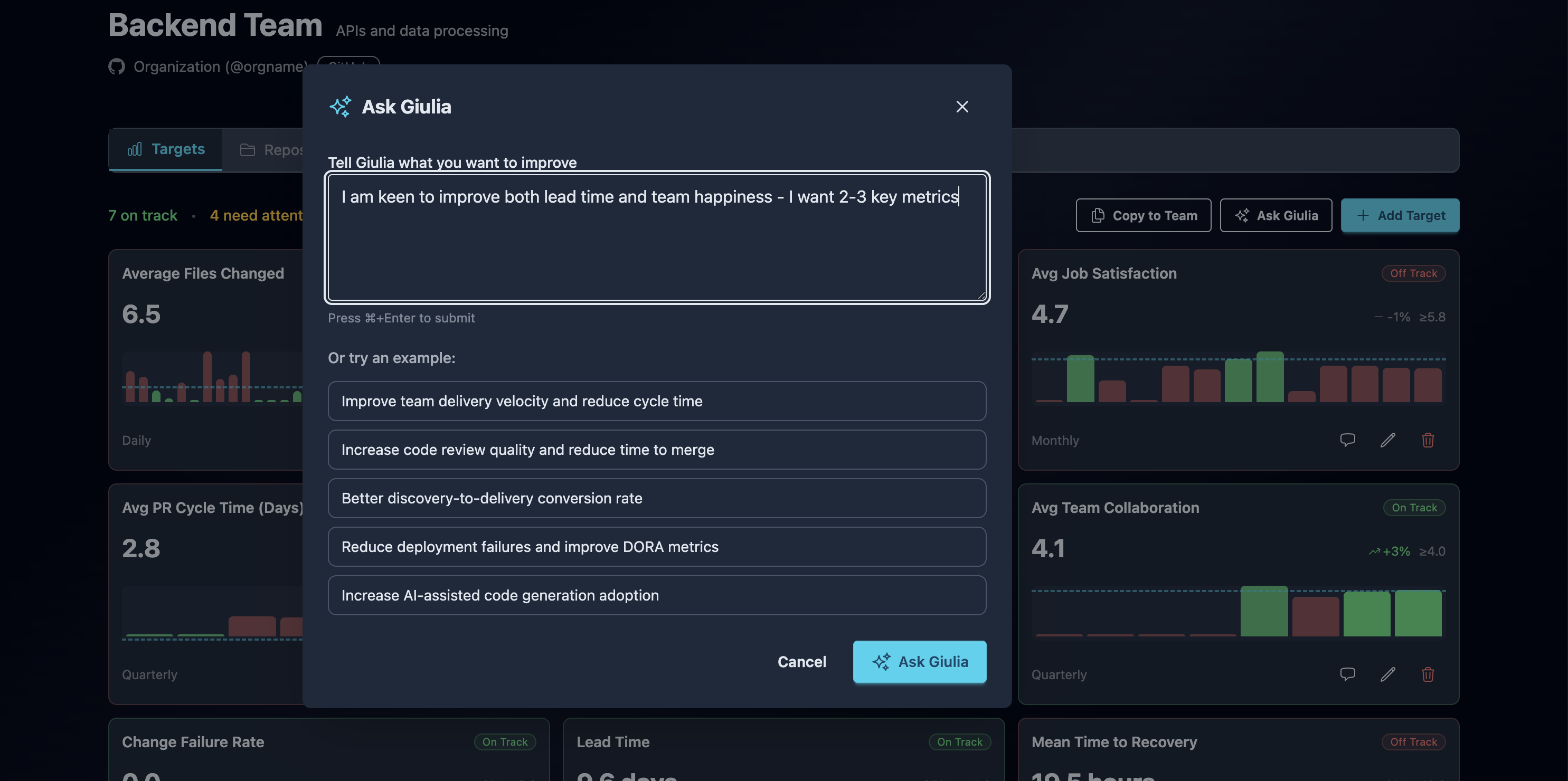
Section titled “How It Works”- Click Ask Giulia on the team guides page
- Enter your goal in natural language
- Giulia analyzes available metrics and your historical data
- Review and apply the recommended guide rails
Step 1: Enter Your Goal
Section titled “Step 1: Enter Your Goal”Describe what you want to achieve in plain language. Examples:
- “Improve team delivery velocity and reduce cycle time”
- “Increase code review quality and reduce time to merge”
- “Better discovery-to-delivery conversion rate”
- “Reduce deployment failures and improve DORA metrics”
- “Increase AI-assisted code generation adoption”
Click an example goal to use it as a starting point, then customize as needed.
Step 2: Review AI Analysis
Section titled “Step 2: Review AI Analysis”Giulia processes your goal in three stages:
- Analyzing Goal - Understanding your intent and enriching the goal
- Gathering Data - Fetching historical performance for relevant metrics
- Generating Guide Rails - Calculating recommended guide rail values
Once complete, you’ll see:
- Enriched Goal - How Giulia understood your request
- Recommended Metrics - 3-5 metrics that best measure progress toward your goal
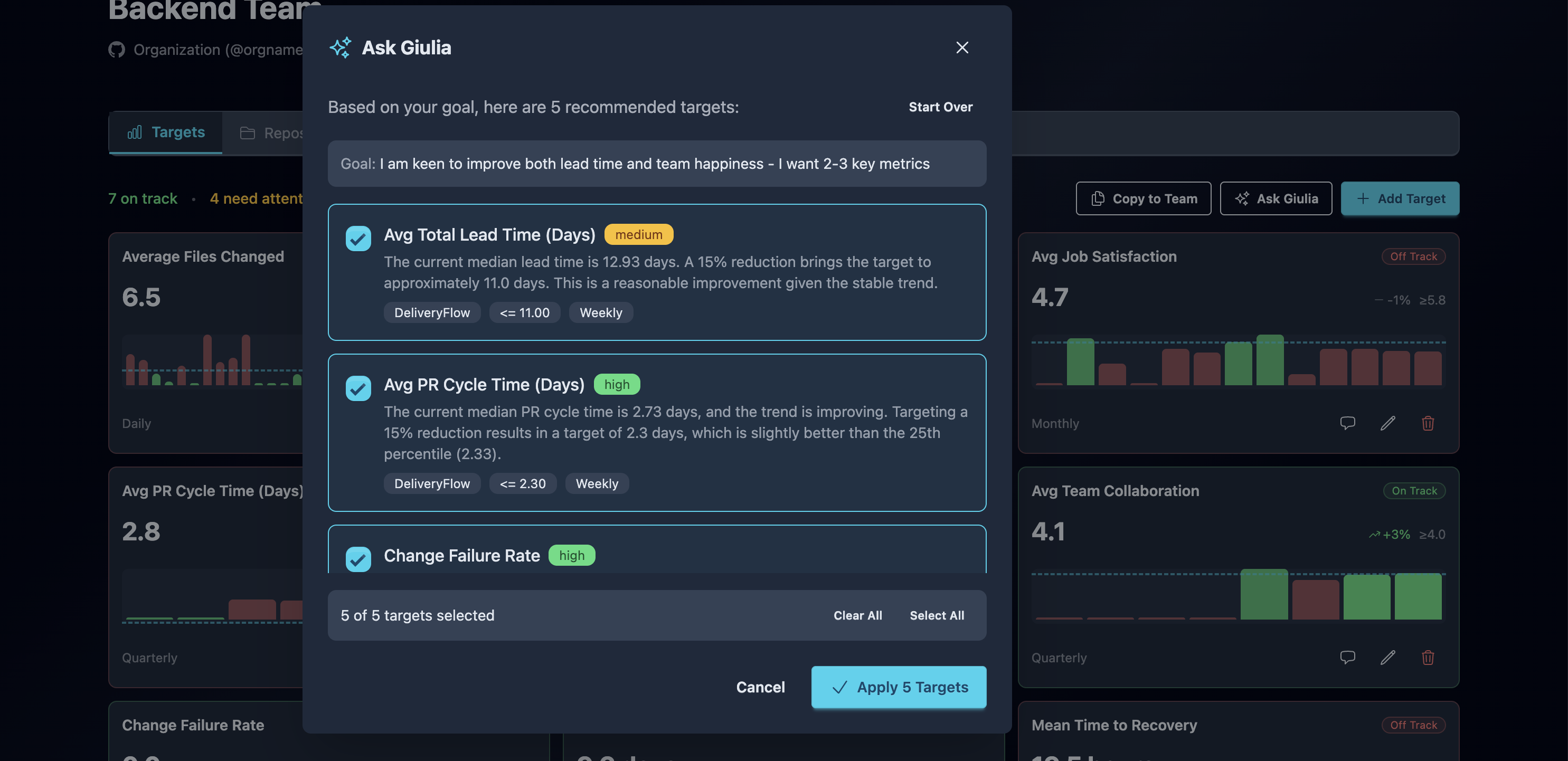
Step 3: Review Recommendations
Section titled “Step 3: Review Recommendations”Each recommendation includes:
| Element | Description |
|---|---|
| Metric Name | The measure being recommended |
| Guide Rail Value | The suggested value based on historical data |
| Guide Rail Type | Whether higher or lower is better |
| Granularity | Recommended measurement frequency |
| Confidence | High, Medium, or Low confidence in the recommendation |
| Reasoning | Why this metric and value were chosen |
Confidence Levels
Section titled “Confidence Levels”| Level | Meaning |
|---|---|
| High | Strong data signal and clear relevance to your goal |
| Medium | Good relevance but limited historical data |
| Low | Relevant but may need adjustment based on context |
Step 4: Apply Selected Guide Rails
Section titled “Step 4: Apply Selected Guide Rails”- Toggle individual recommendations on or off
- Review all selected guide rails before applying
- Click Apply Guide Rails to create all selected guide rails at once
All AI-created guide rails are marked as “AI Suggested” for reference.
Best Practices
Section titled “Best Practices”Setting Effective Guide Rails
Section titled “Setting Effective Guide Rails”- Start with historical data - Use your actual performance as a baseline
- Choose appropriate granularity - Match the frequency to how often the metric can meaningfully change
- Be specific - Clear guide rails are easier to act on than vague goals
- Review regularly - Adjust guide rails as your team improves or priorities change
Using AI Recommendations
Section titled “Using AI Recommendations”- Be descriptive - More context in your goal leads to better recommendations
- Review confidence levels - Consider adjusting low-confidence guide rails
- Don’t accept blindly - AI recommendations are starting points, not final answers
- Combine with manual - Use AI for initial setup, then fine-tune manually
Managing Multiple Guide Rails
Section titled “Managing Multiple Guide Rails”- Focus on 3-5 key guide rails - Too many guide rails dilute attention
- Balance leading and lagging indicators - Track both inputs and outcomes
- Align with team goals - Guide rails should support broader objectives
- Copy successful guide rails - Share configurations across teams when relevant
Next Steps
Section titled “Next Steps”- Guide Rails Overview - Understand guide rail concepts and status indicators
- Delivery Flow Metrics - Explore available delivery metrics
- SPACE Framework - Set balanced guide rails across SPACE dimensions